











Claims assessed by AI,explained line by line
AI CLAIM reads the claim documents, checks them against the policy and its benefits, and proposes a payout with a reason for each line. Your claims team reviews and decides; every AI conclusion is logged.

- automated assessment steps
- 8
- document types read by AI OCR
- 17
- platforms sharing AI CLAIM
- 6
- steps to file a claim in the app
- 3
Working with insurers and banks across Vietnam
Why AI CLAIM
Faster on the paperwork, stricter on the payout
AI CLAIM takes the repetitive work off claims handlers and leaves them the judgement calls.
No more retyping documents
AI reads multi-page claim files, sorts them into 17 document types and extracts every field with a confidence score. Handlers only check the fields AI is unsure about.
Every payout shows its working
Starting from the total on the documents, AI takes off out-of-scope costs, amounts over the limit, deductions and co-payment to reach its proposal. Each cost line shows what is paid and why.
Wrong payouts stop before approval
Drugs without a registration number, out-of-scope costs, amounts over the limit, visits outside the policy period: AI names the line, the amount and the reason so the handler can act.
Your team still decides
AI only proposes. Handlers record whether they agree; the amount written into the assessment is calculated by the system's formula from the policy benefits.
Real screens
See AI CLAIM explain a claim
Screenshots of AI claims in CoreI2 CLAIM, with customer details masked. Pick a part to see it.
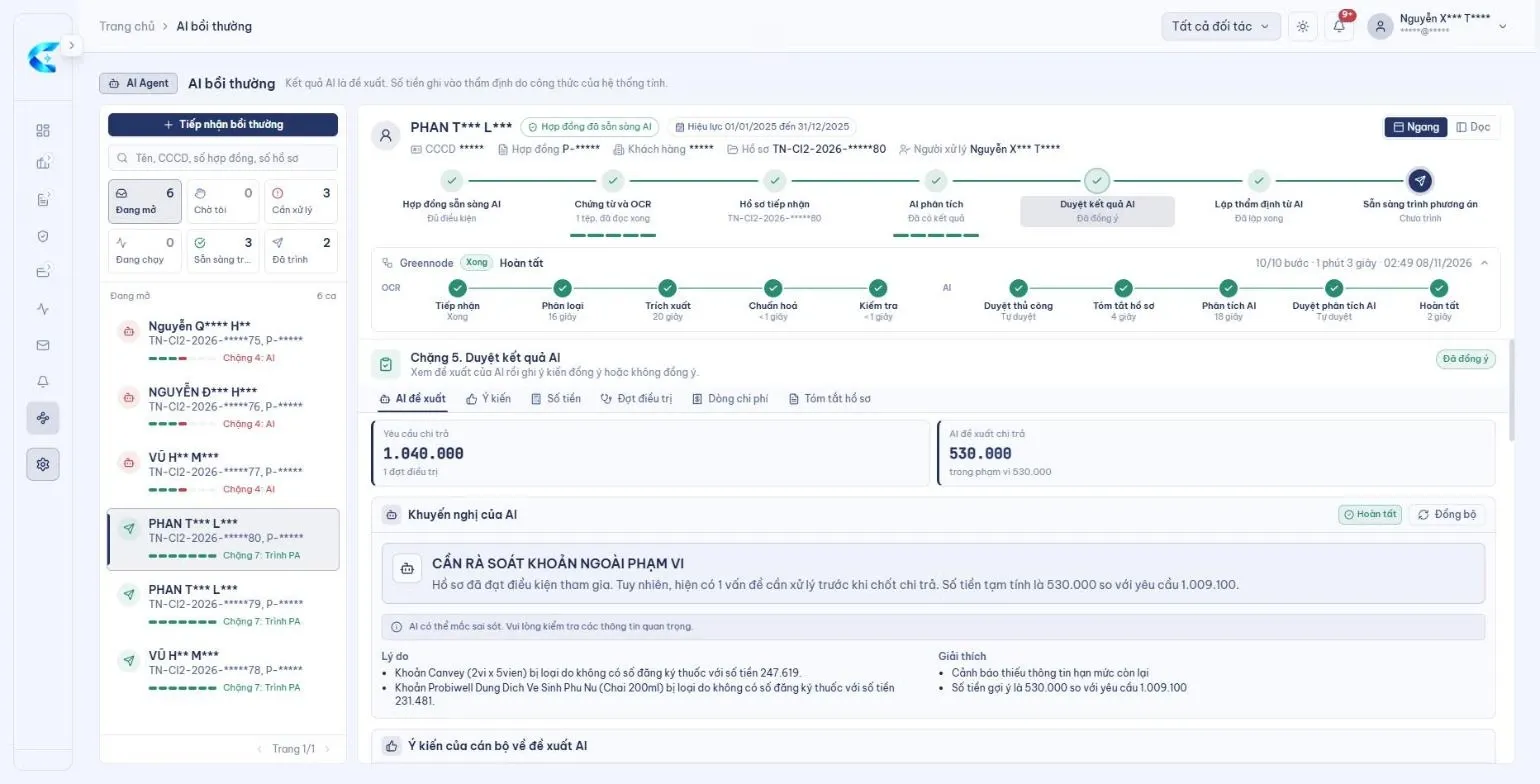
The claim shown: AI ran 10 steps, from reading the documents to the analysis, in 1 minute 3 seconds. Its conclusion names two drugs excluded for having no registration number and proposes 530,000 against the 1,040,000 claimed.
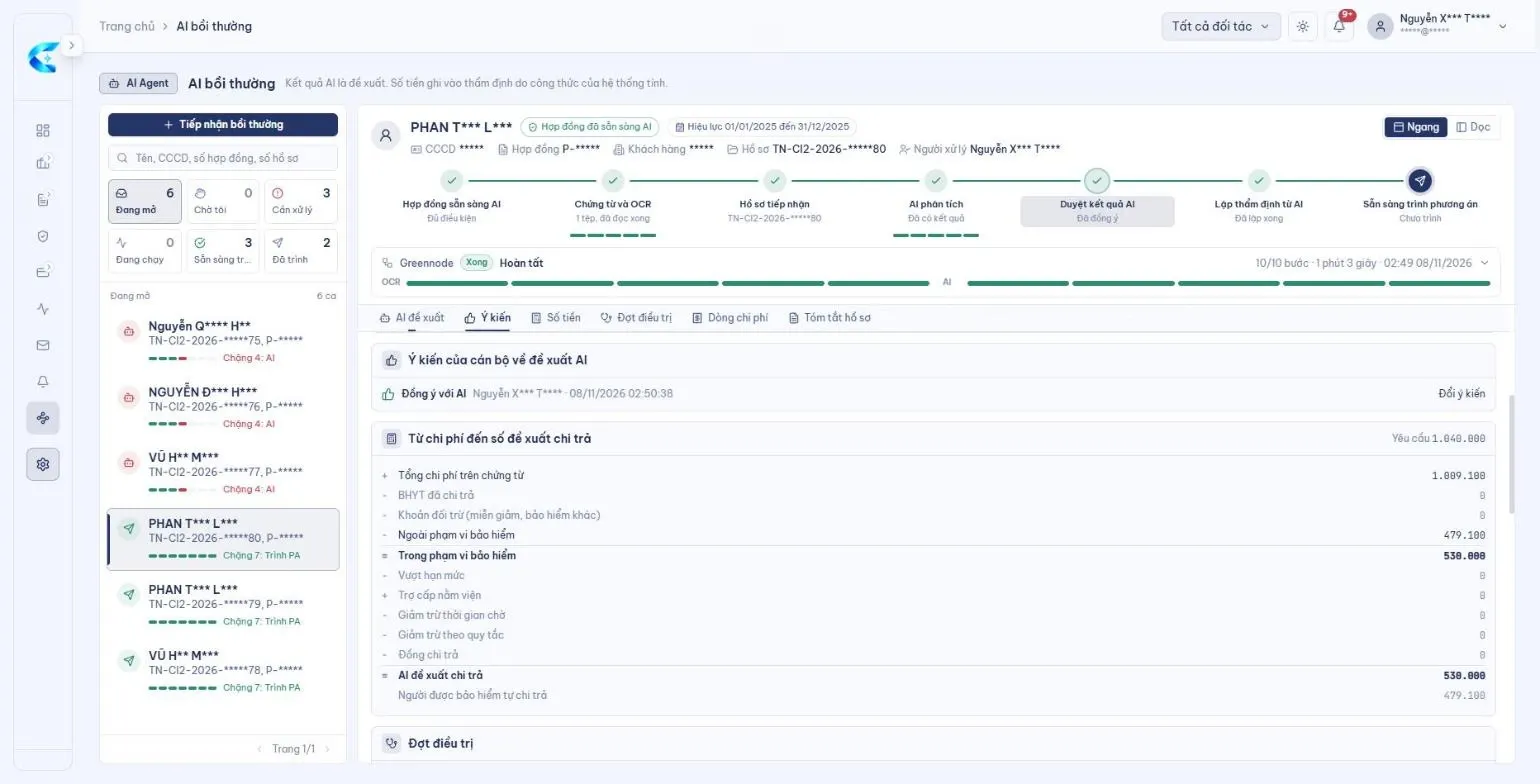
The breakdown runs from the total on the documents, through policy scope, limits, deductions and co-payment, to the amount AI proposes and the part the insured pays.
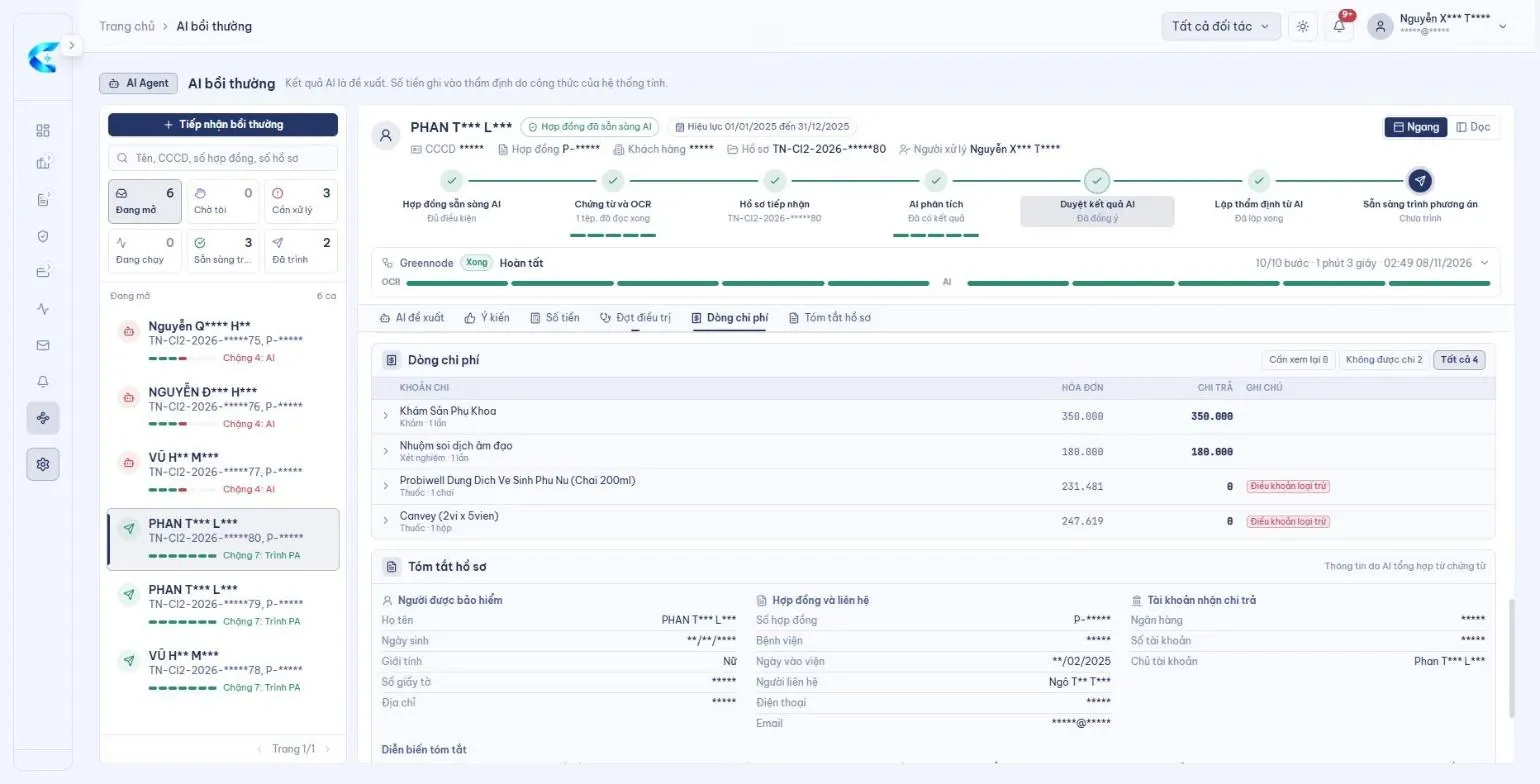
AI matches each cost to a benefit of the policy and records the amount paid for every line. Lines that are not paid carry the reason, such as an exclusion clause.
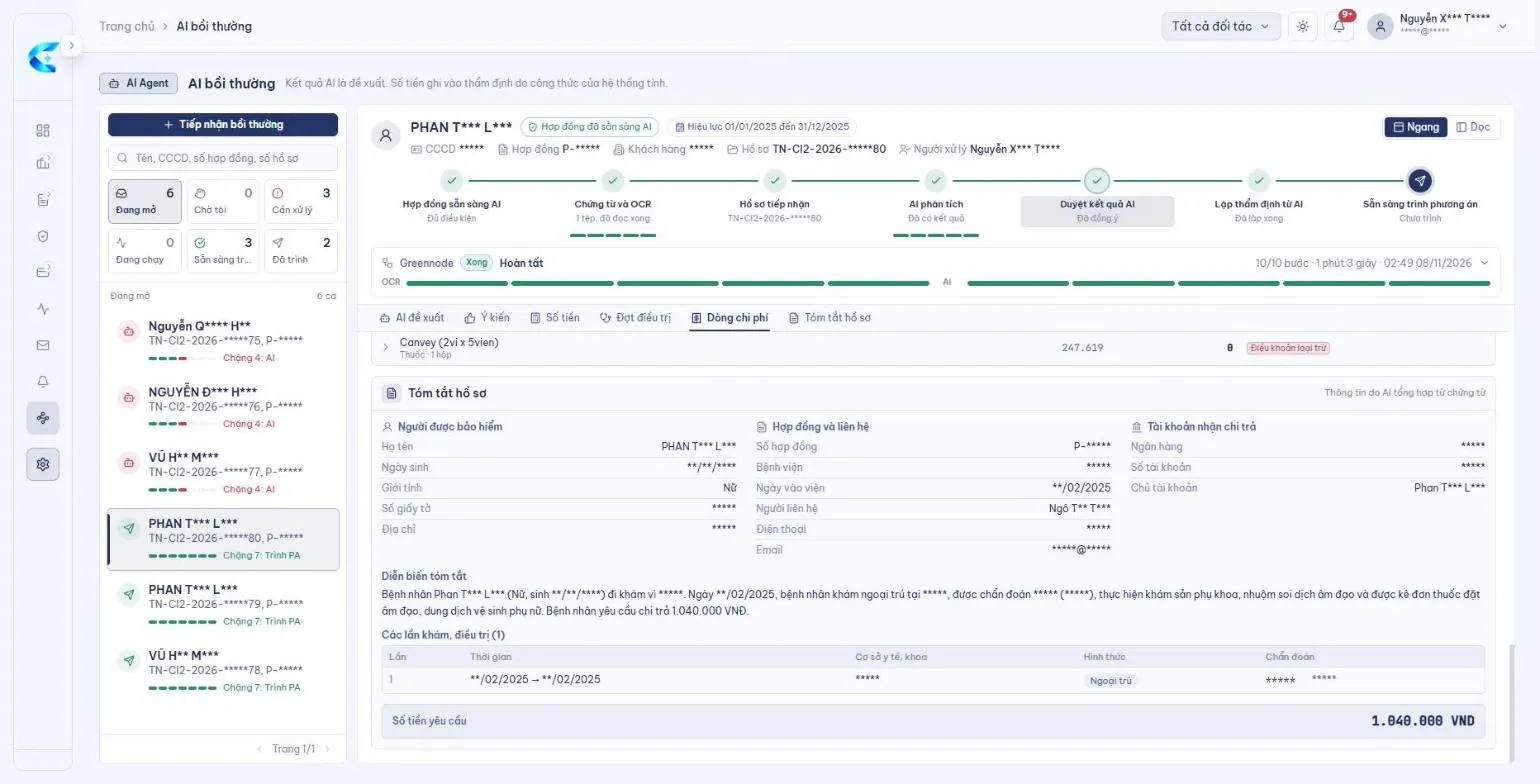
The insured person, policy, payout account and course of treatment, summarised by AI from the documents so the handler sees the whole case on one screen.
Try it
Watch AI CLAIM assess a claim
Pick a scenario: the AI runs the 8 steps in turn, logs every conclusion and stops at the right step when something is off.
Claim
Health · inpatient
- 1OCR & medical document extraction
- 2Insured person & policy
- 3Document validity
- 4Covered expenses
- 5Deductibles & co-payment
- 6Waiting periods
- 7Payout ratio
- 8Benefit allocation
- Pick a scenario to start…
All 8 steps doneThe payout per benefit is ready and goes to an adjuster for approval.
Stopped at step 4 · handed overThe claim only moves on once the adjuster clears the exception.
How AI CLAIM works
From raw files to a payout decision
Five stages, one data flow — whether the claim comes from the app, a hospital or the front desk.
- 1
Multi-channel intake
XeAnTâm app, hospital guarantee portal, medical facilities, direct claims: every claim lands in one data store.
- 2
AI understands
AI OCR recognises 17 document types; AI inspection reads photos of the vehicle.
- 3
AI assesses
8 automated steps: policy, coverage, deductibles, waiting periods, payout ratio, benefit allocation.
- 4
People decide
Exceptions go to an adjuster with the reason and next action; every step has an AI log.
- 5
Payout & tracking
Approval, payment and a real-time backlog dashboard.
Platforms
AI CLAIM on every Ci2 platform
One AI engine, tuned to each product's line of business. Pick a platform to see it.
Medical files read, assessed and paid out by AI
The personal-lines claims platform for insurers and TPAs: from a multi-page medical file to the payout for each benefit.
- AI OCR with a confidence score per field
- Automated 8-step assessment
- Backlog, reserves and SLA dashboard
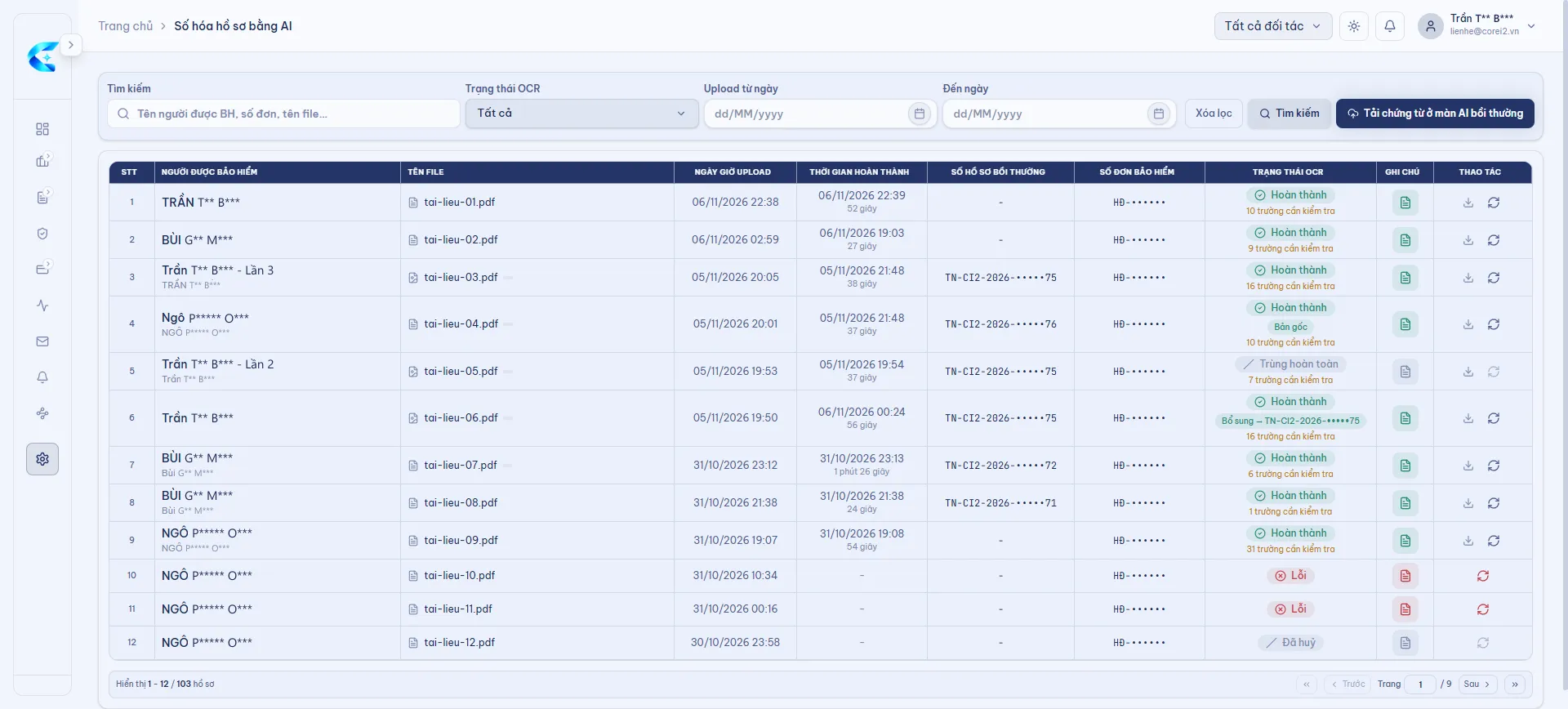
Fast hospital guarantees, right at the hospital
Hospitals send guarantee requests through the portal; they land straight in CoreI2 CLAIM, in the same flow as direct claims.
- AI OCR reads hospital uploads
- AI CLAIM works out the guarantee
- Outcome tracking and payment requests
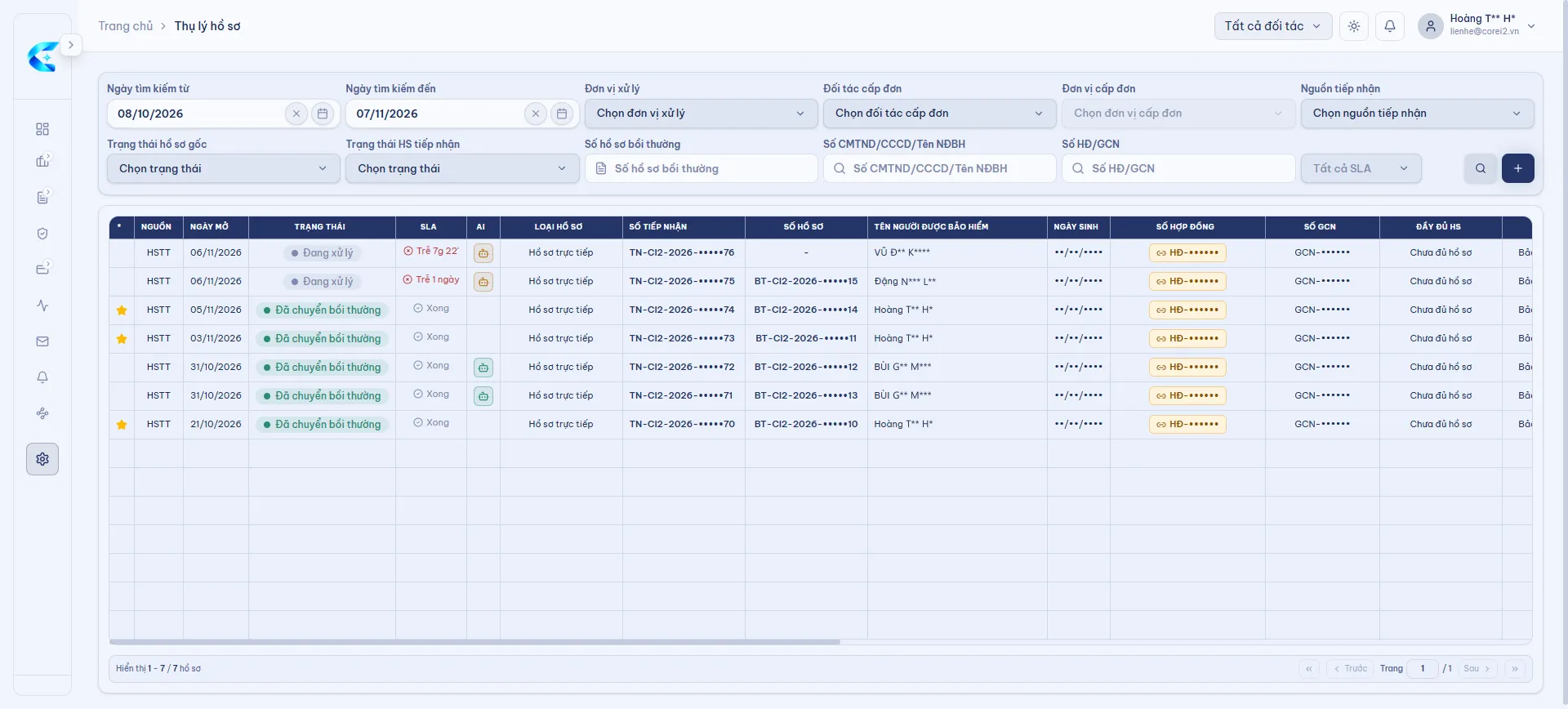
AI vehicle inspection and claims in one process
Claims from the XeAnTâm app and the vehicle inspection app go straight into Car CLAIM, alongside policies, vehicle catalogue, garages and loss adjusters.
- AI damage estimate within minutes
- Policies, vehicles, garages, adjusters in one place
- AI CLAIM checks benefits before approval


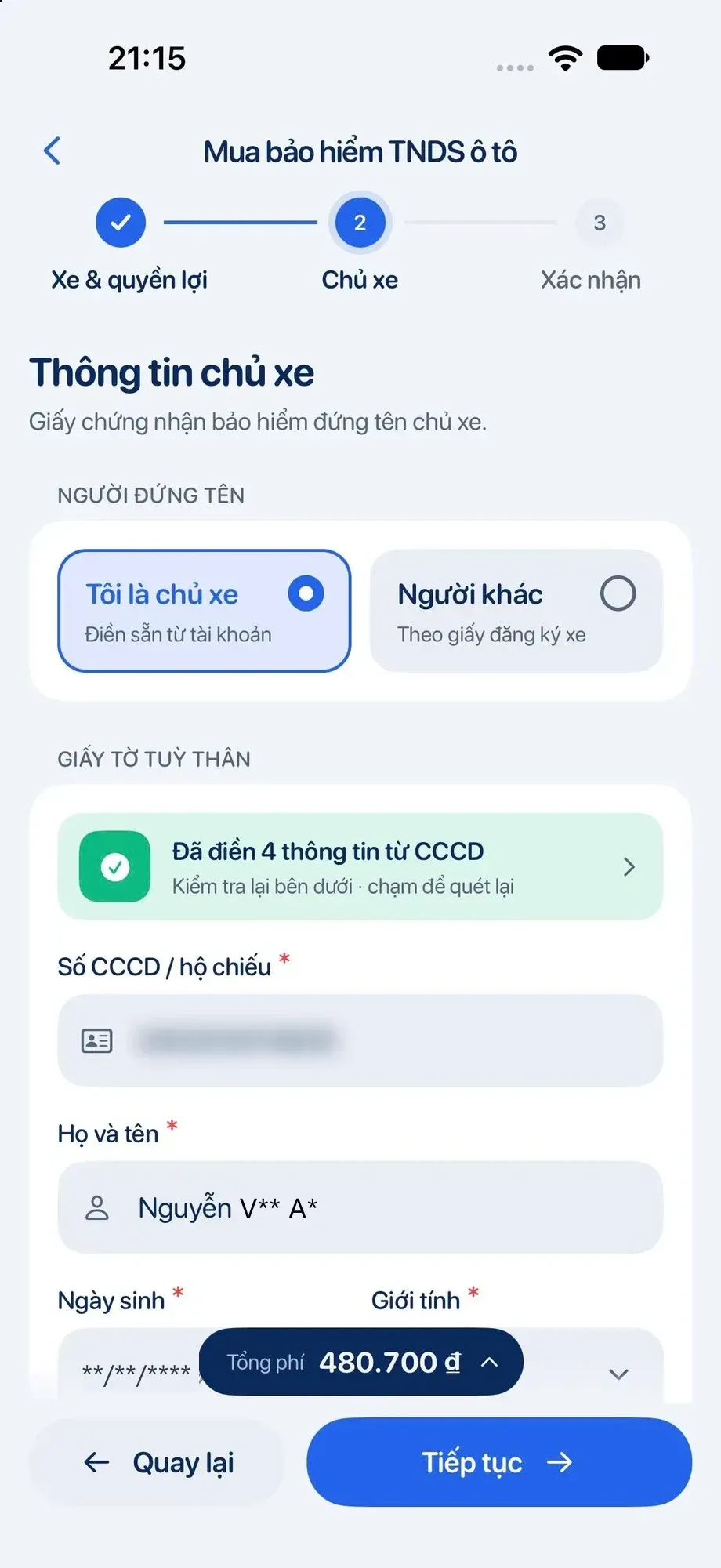
Customers file a claim in 3 steps
Photograph the scene, get an instant AI inspection, follow progress and get paid — all on the phone.
- AI scans ID cards and registrations
- Motor cover from several insurers
- Policies and claims at hand
Inspect a vehicle with a phone, results in minutes
The app guides the user through every angle of the car; AI detects the damage, estimates the loss and builds a transparent inspection file.
- Guided photos for every angle
- AI damage estimate within minutes
- Report goes straight into Car CLAIM


Accurate claim figures for every co-insurer and reinsurer
AI CLAIM's assessment is the single source of figures for splitting a claim between the participating insurers.
- Each participant's share
- Claims filtered by co-/reinsurer
- Figures straight from AI CLAIM
- Lead insurer
- Co-insurers
- Reinsurers
Core platform
All running on the Insurance CORE
AI CLAIM shares the Insurance CORE's API gateway, permissions, data store, AI OCR, printing and email — every new platform inherits the full AI stack from day one.
- API gateway & permissions
- One data store
- Shared AI OCR
- Automated printing & email
Trust
Transparent AI, people in control
A confidence score per field
Every field AI OCR extracts carries a confidence score; low-scoring fields go to a review list.
AI log for every step
The conclusion and duration of every step are kept for adjusters to review.
Stops on exceptions
When something is off, the claim stops at that step, states why and goes to an adjuster.
Role-based access
Menus and data by role; approvals follow amount-based authority levels.
FAQ
Before you bring AI into claims
Does AI CLAIM pay out on its own?
No. AI CLAIM proposes an amount and the reasons; handlers review it, record their opinion and submit it for approval by authority level. The amount written into the assessment is calculated by the system's formula from the policy benefits.
What happens when AI is not sure?
Extracted fields with a low confidence score go to a review list. A claim with an exception stops at the right step, with the reason and the next action for the handler.
Which documents can AI read?
AI OCR recognises 17 document types, including invoices, prescriptions, discharge papers, ID cards and vehicle registrations, even when they come together in one multi-page claim file.
Does AI assess against our own policies?
Yes. AI CLAIM assesses each claim against the insured person's policy and benefits in force: scope, limits, co-payment rate, waiting periods and rule-based deductions.
How is claim data protected?
Menus and data follow each role, and approvals follow amount-based authority levels. AI conclusions and handler actions are logged so internal control can trace them.
How do we get started?
Book a demo to see AI CLAIM handle claims for each line of business. AI CLAIM runs on the Ci2 insurance CORE, so every Ci2 platform has AI from its first day live.
Bring AI CLAIM into your claims process
Book a demo to see AI CLAIM read documents, assess and propose payouts for health, hospital guarantee and motor claims.